
Your ATS, Unlocked Inside Microsoft.
Recruiters live in Teams, Outlook, and Copilot — not the ATS. GLYDE Unity brings your system of record into Microsoft 365, and puts the full power of Microsoft AI to work on your ATS data. Two worlds, one workflow.
Works inside Microsoft 365
Search, manage, and update your ATS — and act on its data — right inside Teams, Outlook, Copilot, Excel, and more. The same capabilities on mobile, where most ATS vendors can barely follow.
.svg.png)
.svg.png)

Runs on your ATS — no migration




of enterprise AI projects fail to deliver ROI
MIT, 2025
of recruiter time spent on admin, not strategic work
Industry research
of a recruiter's day already spent in Outlook & Teams
Your Recruiting Tools Don't Talk to Each Other
Recruiters live in Teams, Outlook, and Copilot all day — but their ATS, texting platform, job boards, and AI tools are completely separate systems.
Every candidate touchpoint requires switching context, copying data between windows, and manually updating multiple systems. The result? 80% of recruiter time is wasted on admin, not building relationships.
Meanwhile, AI tools promise transformation — but 95% of enterprise AI projects fail to deliver ROI because they add another silo instead of connecting existing ones.
Your tools today — all disconnected
Recruiter time allocation
Outlook 50% Teams 25% Less than 10% of time is spent in the ATS
Yet recruiting technology is built around the ATS — and recruiters are expected to keep it up to date manually.
Recruiting Happens in Microsoft 365
Recruiters spend 75% of their day in Outlook and Teams. Less than 10% is spent working in the ATS.
The real work is communication — sending emails, scheduling calls, recording notes, coordinating with hiring managers. As one industry keynote put it this year: "communication and tracking, not database management." The whole industry now agrees.
The disagreement is what to do about it. The incumbents' answer is still come back to the database. Ours isn't. GLYDE Unity meets recruiters where they already live — and writes back to every other system for them.
With GLYDE Unity — all connected
Teams Outlook Copilot Bullhorn Avionte Loxo Microsoft 365 + Your ATS. One Workflow.
Recruiters spend 75% of the day in Outlook and Teams and less than 10% in the ATS. GLYDE Unity puts your ATS inside every Microsoft app — Teams, Outlook, Copilot, Excel, PowerPoint, SharePoint — so you can search, manage, and update it without copy-paste, context-switching, or 'just go update the ATS.'
- Access and manage your ATS inside Teams, Outlook, Copilot, Excel, PowerPoint and SharePoint
- The same capabilities on mobile — where most ATS vendors offer little to none
- Every email, call, and chat logged back to the ATS automatically — no second system to maintain

Your ATS, inside every Microsoft app
Drop in a Spreadsheet. Let AI Do the Work.
Recruiters don't just live in the ATS — they live in spreadsheets. Attach an Excel of candidates, drop in a CSV or PDF, or paste any URL. GLYDE Unity hydrates the rows into the agent so it can screen, draft outreach, or — as shown here — import the records straight into your ATS.
Export to CSV, open in Excel, copy rows into a brief
Attach the .xlsx — AI reads every row and drafts your outreach
Manually key a vendor or lead list into the ATS, row by row
"Import the companies from this sheet" — done in one message
Paste a PDF resume or a LinkedIn URL and hope it parses
Drop the file or URL in — it becomes live context the agent reasons over
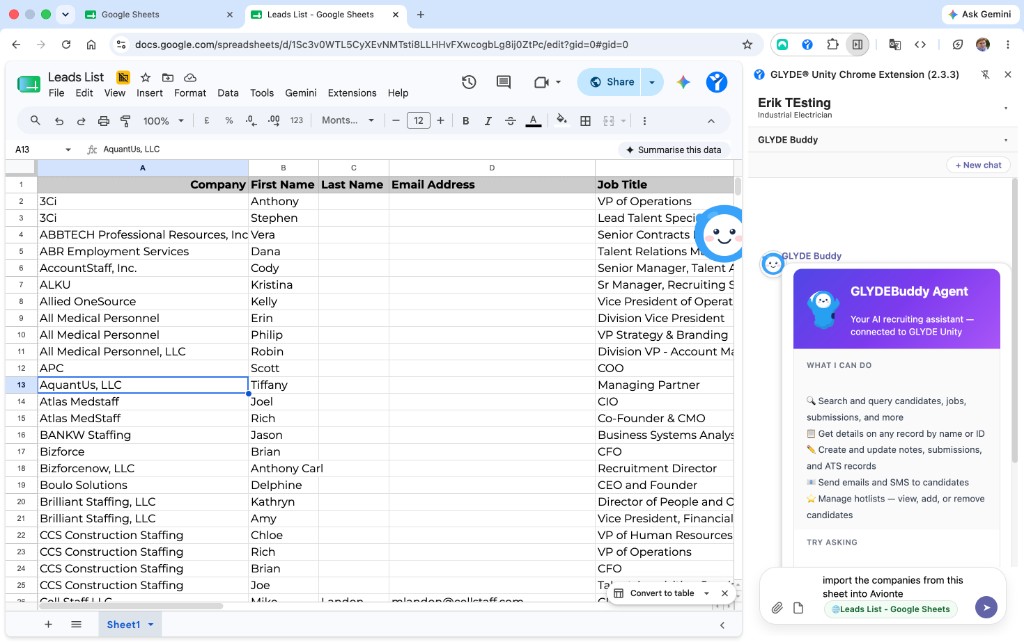
A live spreadsheet attached as context — "import the companies into the ATS"
Like an Iron Man AI super suit for your tech stack
Microsoft AI on Your ATS Data. Your ATS in Microsoft.
Point the full power of Microsoft 365 — Copilot, automation, voice, search — at the data locked inside your ATS. Then surface every candidate, job, and activity right inside Teams and Outlook. The sum of the two is far greater than either alone.
- Voice-first talent agents: engage, qualify, and apply candidates 24/7
- Copilot for Recruiting orchestrates your entire stack in natural language
- Chrome extension: your ATS, everywhere — page-aware, spreadsheet- and PDF-aware
See GLYDE Unity In Action
Watch how GLYDE Unity connects your ATS with Microsoft Teams, Copilot, browser side panels, and automated recruiter workflows.
Omnipresent recruiting AI across your whole stack.
One agent, everywhere your team already works — Teams, web, Chrome, mobile, Outlook, and Copilot.
Three Steps to Unified Recruiting
Connect
Link your ATS and Microsoft 365 in minutes. No data migration. No disruption.
Unify
GLYDE Unity syncs your data, workflows, and communications into one intelligent layer.
Accelerate
Your team works faster with AI agents, voice, automation, and Copilot — all from one platform.
Set It. Schedule It. Forget It.
Don't just ask the agent for an answer — tell it what to do and when. Schedule messages, reports, status checks, reminders, and automatic follow-ups, then let them fire on time from the mobile app, Teams, or your browser.
Recruit From Your Inbox
Email the Inbox Agent a plain-language task, or forward a candidate thread. It reads the context, does the work across your ATS, replies, and logs the activity — no new app to open.
Instruction by email
"Shortlist 5 for the Boston RN role and draft outreach" — sent as an email, returned as a completed result.
Forward to process
Forward a candidate's message; the agent parses intent, matches the record, and drafts or sends the right reply.
Grounded & logged
Replies are grounded in live candidate, job, and application data — and written back to your system of record as activity.
Two-Way Text, In Real Time
Talk with candidates live over two-way text, right inside Microsoft Teams, the Chrome extension, and the web app. Every reply carries full candidate and application context — and every message is logged straight to your ATS.
Live two-way text
Real-time SMS and chat with candidates — send, receive, and continue the thread without leaving your workspace.
Full application context
Each conversation is grounded in the live candidate, job, and application record, so replies are always informed.
Teams, browser & web
The same conversation follows you across Microsoft Teams, the Chrome extension, and the web app.
Conversation continuity
A candidate cut off mid-thread resumes naturally — context carries across sessions and surfaces.
Auto-logged to your ATS
Every inbound and outbound message is written back to your system of record as activity — no copy/paste.
Voice & text together
Candidates toggle between voice and text with full context maintained across both modes.
A Copilot Agent for Recruiting
GLYDE Unity shows up natively in Microsoft 365 Copilot. Ask it to search your ATS, catch you up on a candidate, draft outreach, or run a multi-step task — in plain language, right alongside the rest of your work.
Ask in plain language
"Show me qualified applicants for this role" or "catch me up on Sarah Chen" — no query syntax, no console.
Works across your stack
Copilot reaches your ATS, search index, and connected systems — answers span everything, not one silo.
Runs multi-step tasks
Search, draft, update, and log in a single conversation — the agent orchestrates the steps for you.
Grounded in your data
Every answer is grounded in live, organization-scoped ATS data — not generic web guesses.
Agentify Everything You Connect
GLYDE Unity doesn't bolt an assistant onto one tool. Connect a system and it becomes available to your agents and Copilot automatically — so every app, record, and workflow gets a smart assistant you can talk to in plain English, and that actually gets the job done.
An agent on everything
Every connected system, record, and workflow gets its own assistant you can talk to — one that takes action, not just looks things up.
AI-ready the moment you connect
Connect a tool and it becomes available to your agents and Copilot automatically. No special project, no wiring exercise.
One way to work, everywhere
A single, consistent way to act across every connected system — learn it once, use it the same way everywhere.
Build your own with MCP & API
Use the MCP layer and REST API to extend agents to custom systems and bespoke workflows your team depends on.
The Platform, Up Close
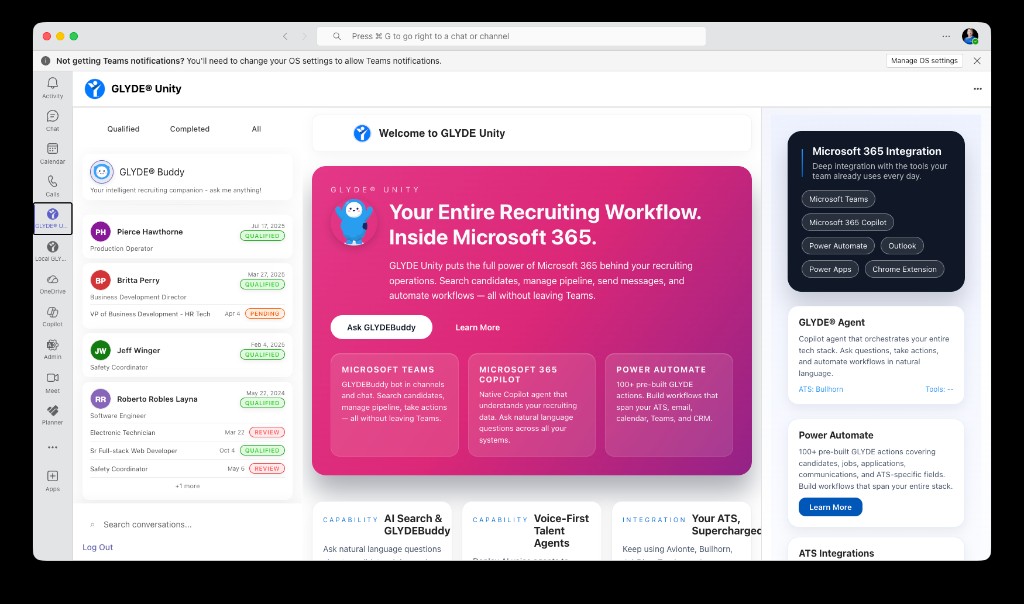
Explore how GLYDE Unity works across Teams, voice, Copilot, and Power Automate.
GLYDEBuddy lives inside Microsoft Teams — search candidates, send messages, check applications, and manage your pipeline without leaving the conversation.
Connects With Your Existing Stack


Every Recruiter. Every Tool. Every Candidate. One Unity.
Unite Microsoft and Your ATS in One Move.
Bring your system of record into Microsoft 365 — and put Microsoft AI to work on your ATS data. See it in 20 minutes.
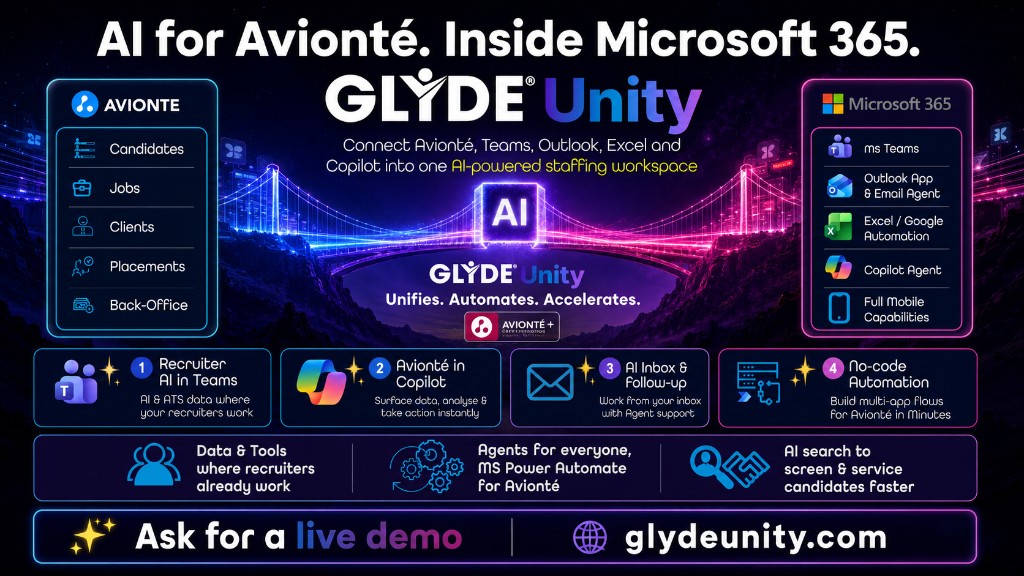
Connect Avionté, Teams, Outlook, Excel and Copilot in minutes.