Your ATS. Everywhere You Work.
The GLYDE Unity Chrome Extension puts the entire Teams app inside your browser — always on, page-aware, and deeply connected to your ATS. Recruiters live in the browser. Now your recruiting intelligence does too.
Recruiters spend their day in the browser — on job boards, in spreadsheets, in the ATS, in email. Yet recruiting tools force them to leave the browser to get anything done.
The GLYDE Unity Chrome Extension closes that gap. It's the same GLYDEBuddy you use in Teams, rebuilt as a persistent side panel that understands the page you're on. Pull in a candidate from Bullhorn. Attach a spreadsheet. Drop in a URL. The agent already has the context — you stay in flow.
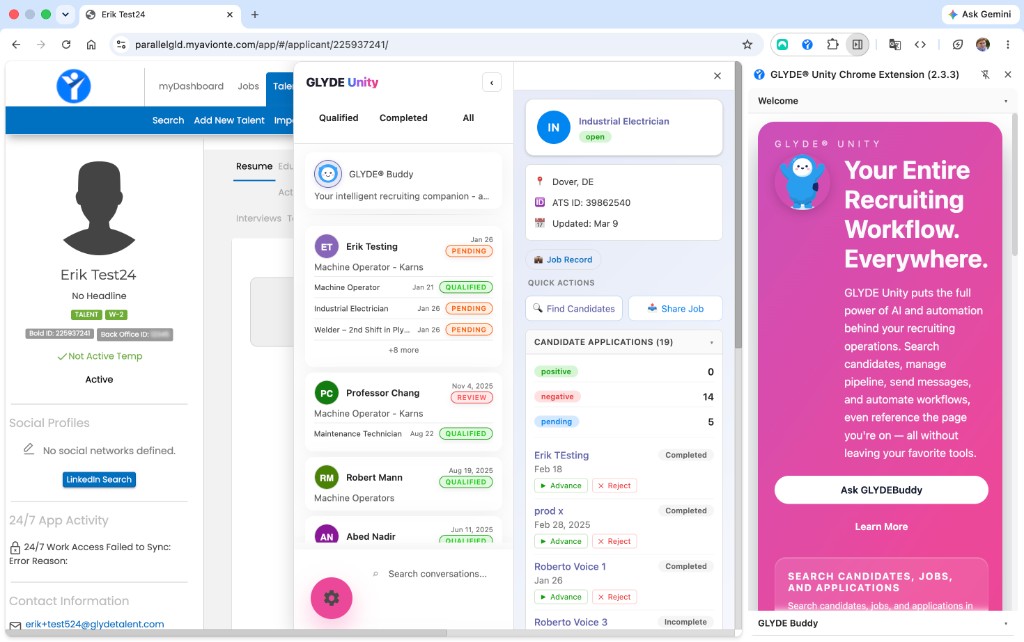
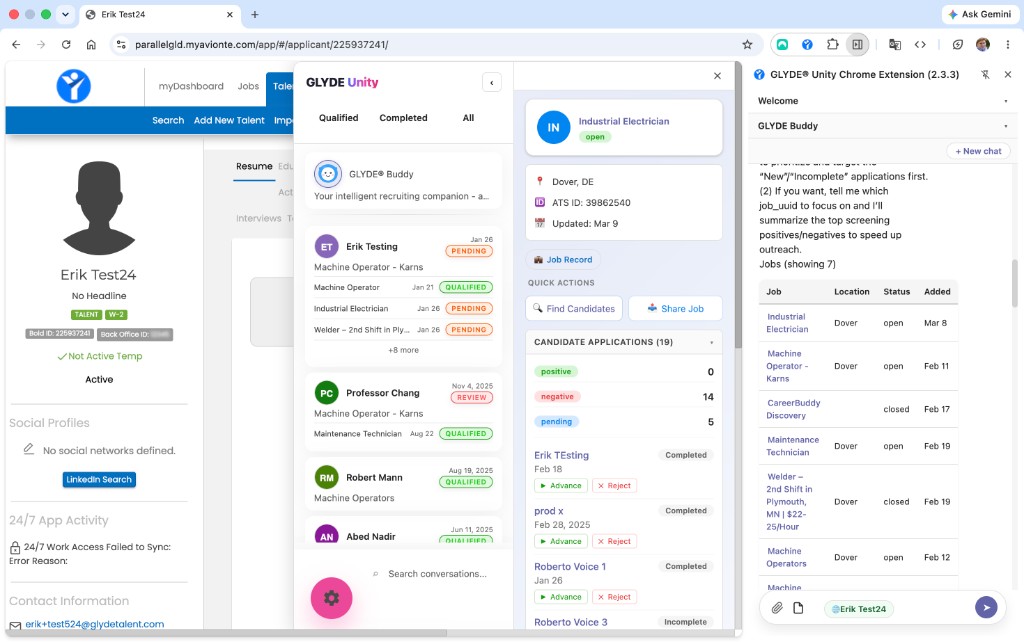
The side panel, open on an Avionté applicant page
More Than a Browser Plugin
A real recruiter workbench that follows you across every page — and knows what's on screen.
Always-On Side Panel
A dedicated Chrome Side Panel that stays open while you navigate. Your candidates, conversations, and GLYDEBuddy chat persist across ATS pages, job boards, and email clients — never a popup that closes.
Page-Aware Context
On Bullhorn and Avionté pages, the extension detects the candidate or job on screen and brings that record into GLYDEBuddy automatically. Ask a question — it already knows who you are looking at.
Spreadsheet & Document Context
Working from a Google Sheet or pasting a candidate list? Attach a spreadsheet, CSV, or PDF and the rows are hydrated into the agent. Drop in any URL and it becomes context GLYDEBuddy can reason about and act on.
Gentle on Your ATS
Behind the scenes, the extension is easy on your ATS — it batches lookups and refreshes quietly in the background, so panels stay fast and always show the latest record, never stale data.
Deep ATS Record Links
Every candidate, job, and application surfaces clickable links straight to the matching record in your ATS — Bullhorn, Avionté, JobDiva, or Tracker. No copy/paste of IDs, no hunting for the right tab.
Full Teams Parity
The extension is built from the same modules as the Teams app. Candidate search, SMS and email composition, application tracking, activity logging, quick actions, voice agents, and ACS chat — all present.
A Side Panel That Never Closes
Popups vanish the moment you click away. The GLYDE side panel stays docked — your conversations list, candidate details, and GLYDEBuddy chat remain visible while you navigate the ATS, a job board, or your inbox.
Persists across navigation
Move from a Bullhorn candidate page to a Google Sheet — your panel and chat history stay put.
Conversation list + CRM details, docked
Selecting a conversation opens the candidate column inline, not as a blocking overlay.
No re-login, ever
Sign in once on app.glydebuddy.com — tokens sync to every tab via Chrome storage and broadcast automatically.
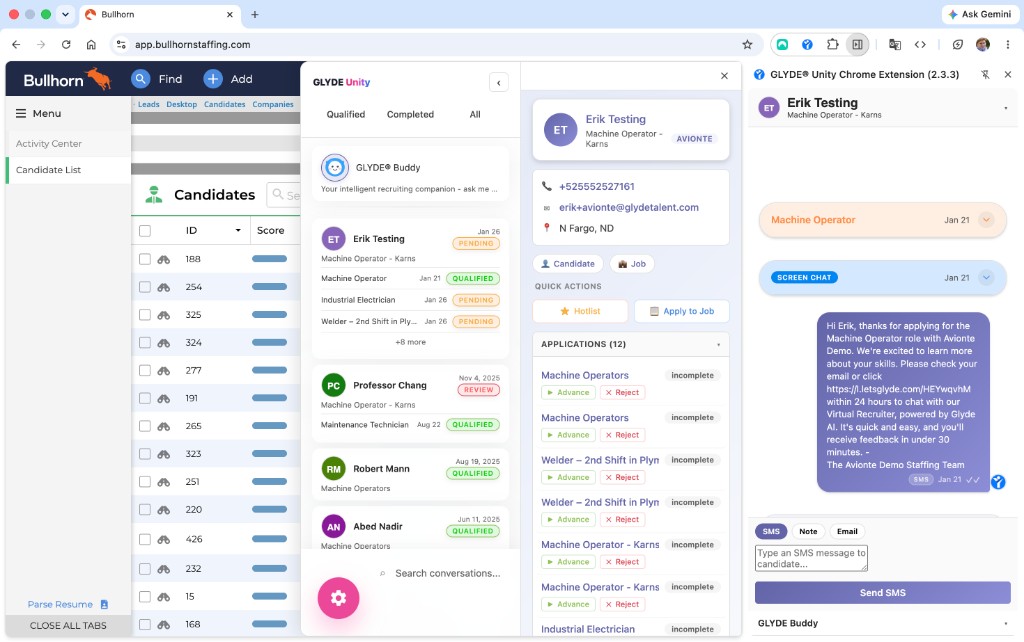
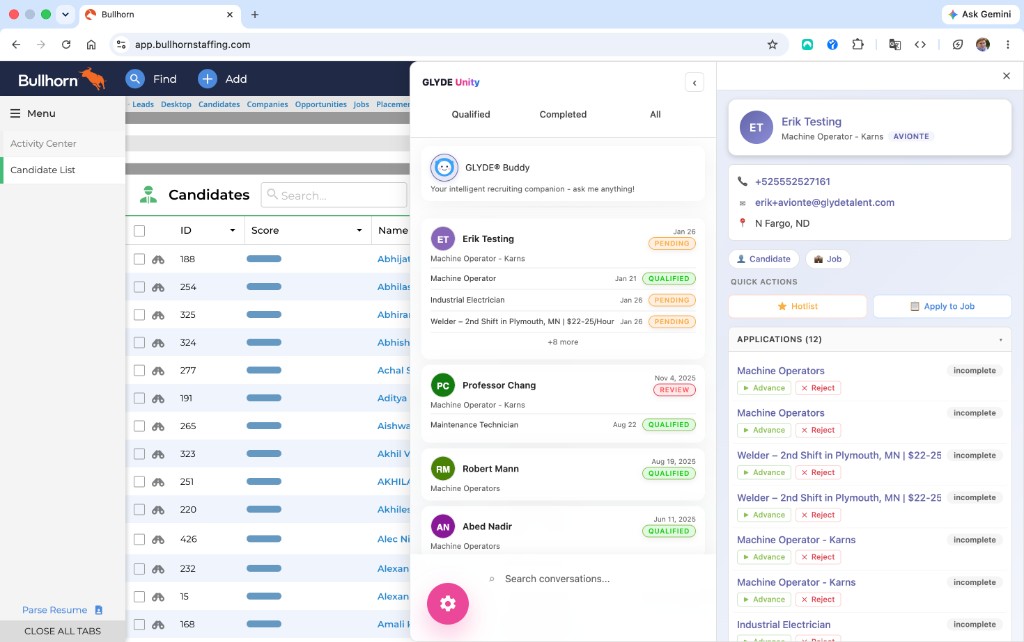
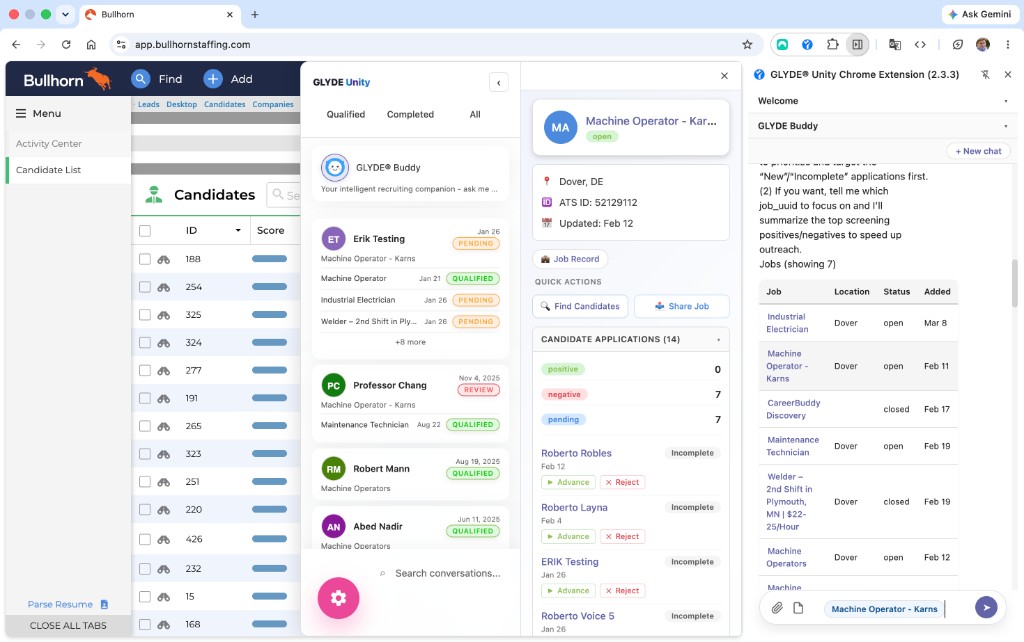
Conversations, candidate detail, and chat — docked on a Bullhorn page
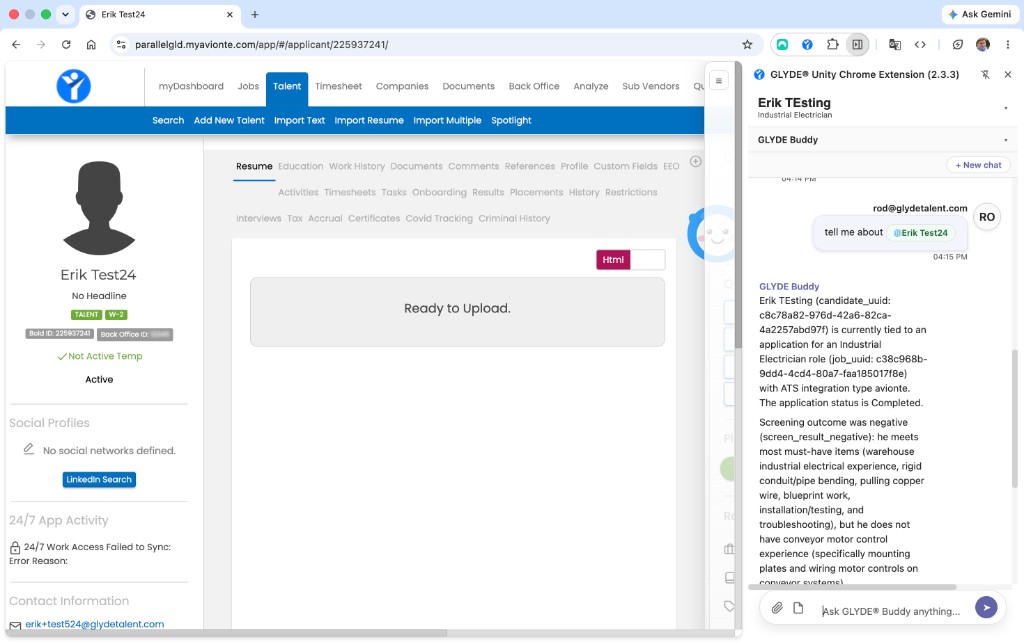
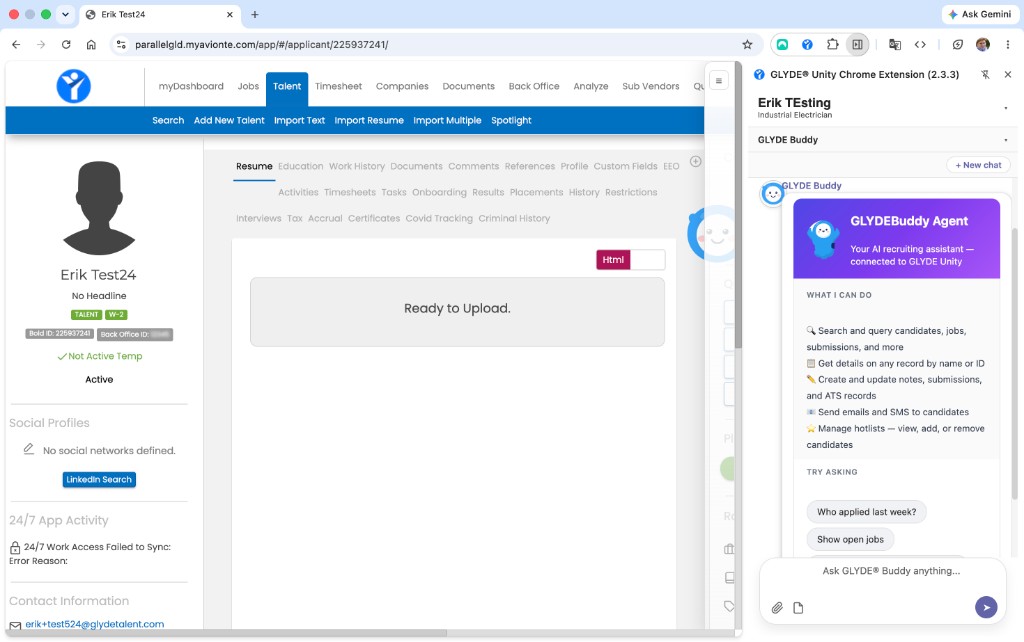
Ask about the applicant on screen — the agent already has the record
It Knows What's On Your Screen
Dedicated detectors recognize Bullhorn and Avionté candidate and job pages. The record on screen is pulled into GLYDEBuddy's context automatically — ask "tell me about this candidate" and the agent answers with the linked record, application status, and screening outcome.
Bullhorn detector
Recognizes candidate, job, and application pages on bullhornstaffing.com.
Avionté detector
Surfaces applicant and assignment records on *.myavionte.com tenants.
Any other page
Drop in a URL as context and the agent reasons over it.
No copy/paste
Record UUIDs and ATS IDs are captured from the page, never typed.
Spreadsheets, PDFs, and URLs — All Context
Recruiters don't just live in the ATS — they live in spreadsheets. Attach an .xlsx of candidates, drop in a CSV, paste a PDF resume, or add any URL. The extension hydrates the rows into the agent so GLYDEBuddy can draft outreach, screen, or — as shown here — import the companies straight into your ATS.
Open ATS, search candidate, copy details, paste into email
Ask GLYDEBuddy on the candidate's ATS page — it already has the context
Export candidates to CSV, open in Sheets, copy rows into a brief
Attach the .xlsx — GLYDEBuddy reads the rows and drafts your outreach
Paste a LinkedIn URL into a note and hope it resolves
Drop the URL in as context — the agent reasons over the page
Flip between ATS tabs to cross-reference applications
Side panel shows timeline, applications, and notes without leaving the page
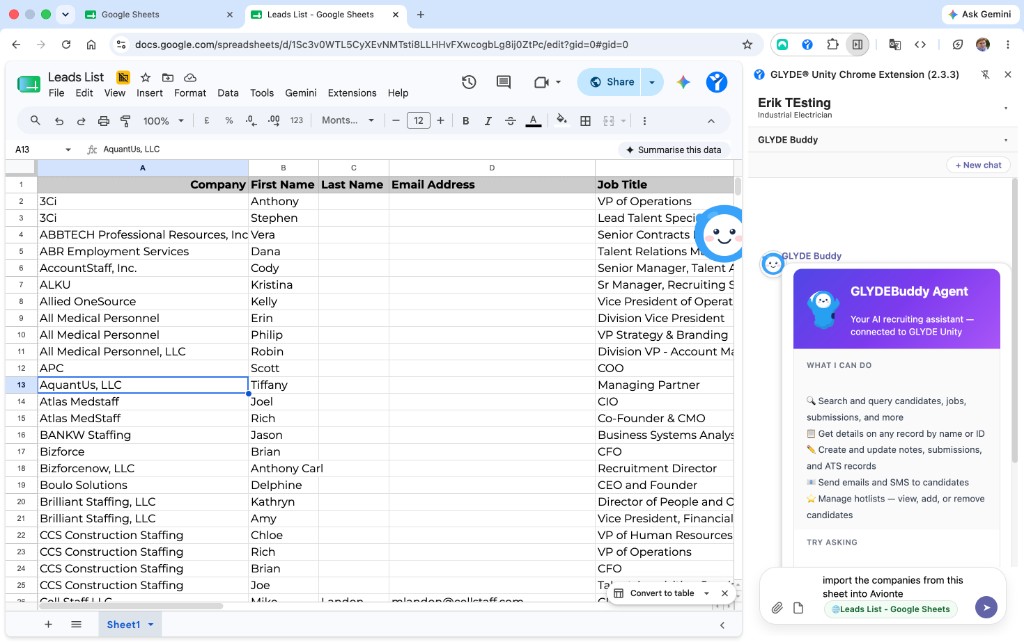
A Google Sheet attached as context — "import the companies into Avionté"
The Panel, In Detail
A closer look at what the side panel does while you stay on the page.
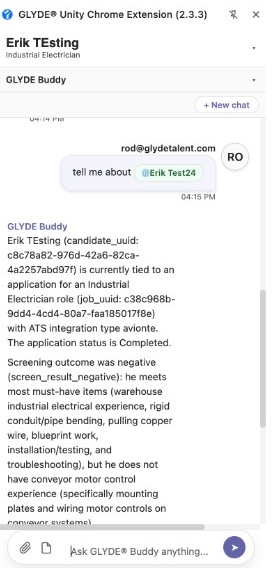
Knows the candidate on screen
Ask "tell me about this candidate" and GLYDEBuddy answers with the linked record, application status, and screening outcome — no IDs typed.
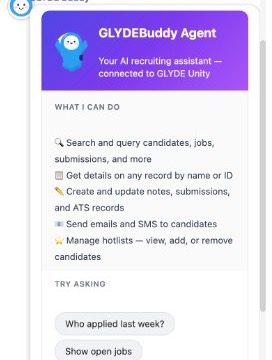
A full recruiting agent
Search, get record details, create notes and ATS records, send SMS and email, and manage hotlists — all from the panel.
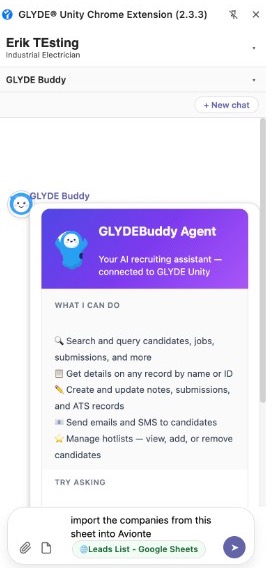
Acts on your spreadsheet
"Import the companies from this sheet into Avionté" — the attached Google Sheet becomes live context the agent can act on.
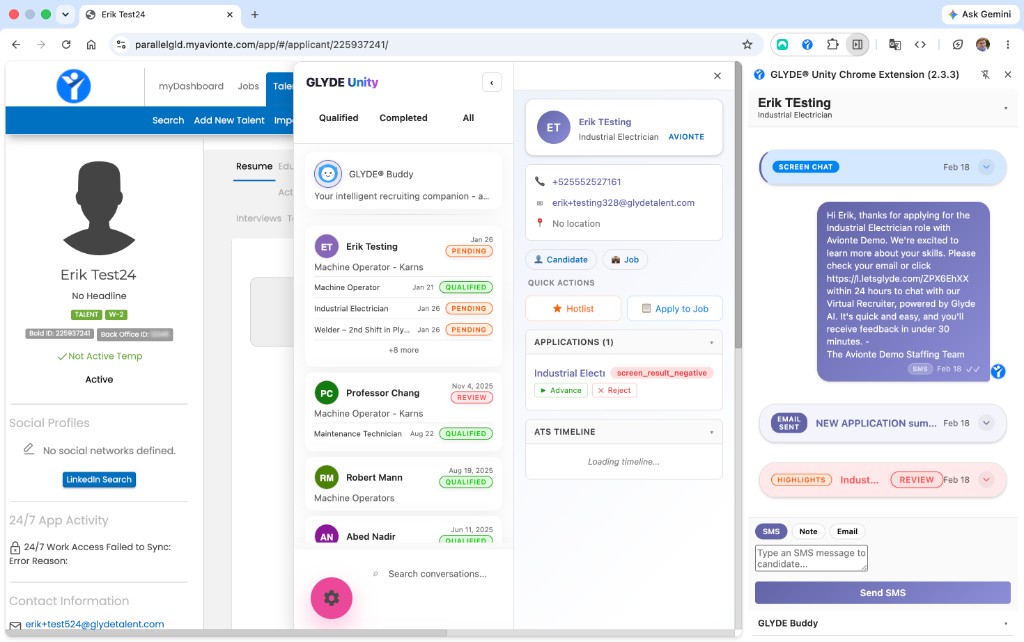
Applications, ATS timeline, and screening history — merged in one view
Smart Caching, Less ATS Load
The extension doesn't hammer your ATS. A background service worker buffers record IDs and flushes them in efficient batches, while conversation caches are checked for staleness and refreshed near-real-time — without ever overwriting a newer view with stale data.
Buffered ATS ID flush
Service-worker alarms batch ATS record lookups so repeated clicks become a single efficient call.
Stale-cache refresh
Conversations are re-fetched in the background and pushed to every tab when newer data arrives.
Render sequencing
Panel renders are sequenced so a slow response can never paint over a newer candidate selection.
Unified profile merge
ATS timeline, screening history, and notes are merged server-side into one chronological view.
The Same Power, Inside Every ATS
Real captures from Bullhorn and Avionté. Whatever your ATS, the experience is the same.
The Teams App. In Your Browser.
The extension is built from the same shared modules as the Teams app — same features, same data, same intelligence. Plus a few things only a browser can do.
| Capability | Chrome Extension | Teams App |
|---|---|---|
| Candidate & job search | ||
| GLYDEBuddy chat agent | ||
| SMS & email composition | ||
| Application tracking & quick actions | ||
| Activity logging to ATS | ||
| Voice agents | ||
| ACS chat rooms | ||
| Page-aware ATS context capture | ||
| Works on any webpage / spreadsheet | ||
| Cross-tab session sync |
The last three rows are capabilities only a browser-based extension can offer — page awareness, universal page support, and cross-tab sync.
Deep Links Into Every Major ATS
Every candidate, job, and application surfaces clickable links straight to the record in your ATS. No migration. No duplication.
Two-Way Text, In Real Time
Talk with candidates live over two-way text, right inside Microsoft Teams, the Chrome extension, and the web app. Every reply carries full candidate and application context — and every message is logged straight to your ATS.
Live two-way text
Real-time SMS and chat with candidates — send, receive, and continue the thread without leaving your workspace.
Full application context
Each conversation is grounded in the live candidate, job, and application record, so replies are always informed.
Teams, browser & web
The same conversation follows you across Microsoft Teams, the Chrome extension, and the web app.
Conversation continuity
A candidate cut off mid-thread resumes naturally — context carries across sessions and surfaces.
Auto-logged to your ATS
Every inbound and outbound message is written back to your system of record as activity — no copy/paste.
Voice & text together
Candidates toggle between voice and text with full context maintained across both modes.
Set It. Schedule It. Forget It.
Don't just ask the agent for an answer — tell it what to do and when. Schedule messages, reports, status checks, reminders, and automatic follow-ups, then let them fire on time from the mobile app, Teams, or your browser.
Bring GLYDE Into Your Browser
Install the Chrome Extension and turn every page into a recruiting surface. See it in action with a personalized demo.