One Platform. A Persona for Every Team.
Recruiting, sales, marketing, and service each get an AI agent tuned to their workflow — grounded in your ATS and CRM, and working everywhere your team already does.
Generic chatbots treat a recruiter, a salesperson, and a service rep the same way. Your teams don't work the same way — so their agents shouldn't either.
GLYDE Unity Agent Personas are purpose-built agents that share the same secure platform, tools, and data — but each is tuned for the work its team actually does. The persona knows which tools to reach for, how to phrase results, and what to surface first, while every persona stays inside the same enterprise-grade security and your live ATS/CRM context. (Screening is handled by the dedicated Talent Agents persona.)
A Persona Tuned to the Job
Same platform, same data, same guardrails — different expertise.
Recruiting Persona
Sourcing, shortlisting, outreach drafting, pipeline nudges, and candidate Q&A — grounded in live ATS records and your search index.
Sales Persona
Account research, deal context, follow-up drafting, and next-best-action prompts pulled from your CRM and connected systems.
Marketing Persona
Campaign copy, segment insight, talent-pool messaging, and content drafts that stay on brand and on message.
Service Persona
Candidate and client support, status answers, and case context — resolving routine questions and escalating cleanly when needed.
Shared Tools & Memory
Every persona draws on the same connectors, search index, and conversation context, so handoffs between teams keep their thread.
Enterprise-Grade Security
Every persona inherits your organization's permissions and data isolation, so people only ever see what they should. Change a capability once, and it updates everywhere.
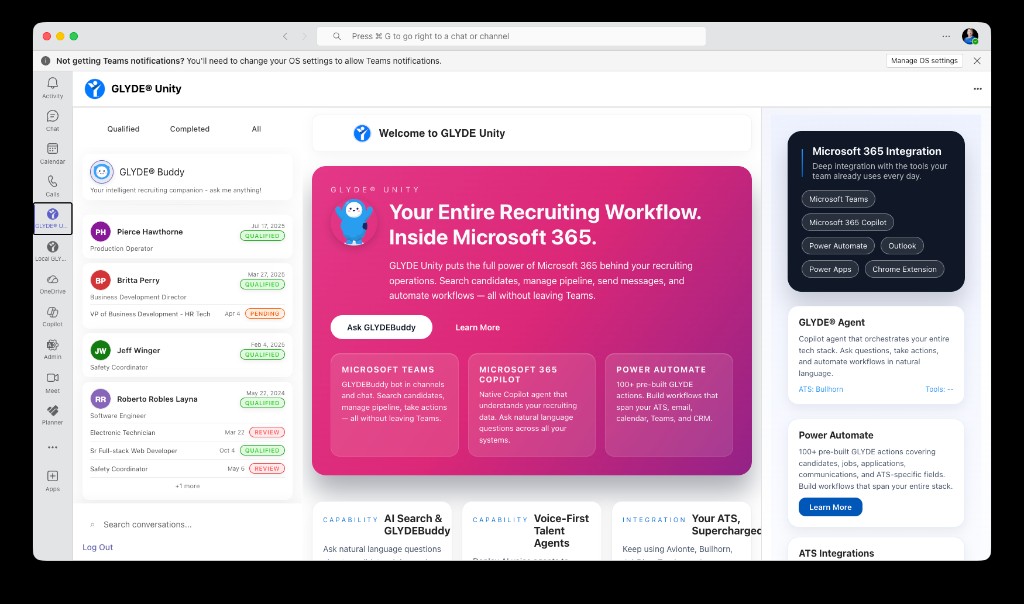
Role-aware personas, working inside Microsoft Teams
One Runtime, Many Experts
Pick the persona for the surface
Each channel — Teams, browser, mobile, voice — requests the persona that fits the team using it.
The persona selects its tools
Behind the scenes, the shared agent runtime composes the right prompt and chooses the right tools for the role and the question.
Grounded answers, in context
Results are grounded in your ATS/CRM and search index, phrased for the role, and written back to the system of record when appropriate.
Improve once, benefit everywhere
Because personas share one runtime, an improvement to reasoning, tools, or guardrails lifts every team at once.
Where Personas Show Up
Recruit From Your Inbox
Email the Inbox Agent a plain-language task, or forward a candidate thread. It reads the context, does the work across your ATS, replies, and logs the activity — no new app to open.
Instruction by email
"Shortlist 5 for the Boston RN role and draft outreach" — sent as an email, returned as a completed result.
Forward to process
Forward a candidate's message; the agent parses intent, matches the record, and drafts or sends the right reply.
Grounded & logged
Replies are grounded in live candidate, job, and application data — and written back to your system of record as activity.
A Copilot Agent for Recruiting
GLYDE Unity shows up natively in Microsoft 365 Copilot. Ask it to search your ATS, catch you up on a candidate, draft outreach, or run a multi-step task — in plain language, right alongside the rest of your work.
Ask in plain language
"Show me qualified applicants for this role" or "catch me up on Sarah Chen" — no query syntax, no console.
Works across your stack
Copilot reaches your ATS, search index, and connected systems — answers span everything, not one silo.
Runs multi-step tasks
Search, draft, update, and log in a single conversation — the agent orchestrates the steps for you.
Grounded in your data
Every answer is grounded in live, organization-scoped ATS data — not generic web guesses.
Agentify Everything You Connect
GLYDE Unity doesn't bolt an assistant onto one tool. Connect a system and it becomes available to your agents and Copilot automatically — so every app, record, and workflow gets a smart assistant you can talk to in plain English, and that actually gets the job done.
An agent on everything
Every connected system, record, and workflow gets its own assistant you can talk to — one that takes action, not just looks things up.
AI-ready the moment you connect
Connect a tool and it becomes available to your agents and Copilot automatically. No special project, no wiring exercise.
One way to work, everywhere
A single, consistent way to act across every connected system — learn it once, use it the same way everywhere.
Build your own with MCP & API
Use the MCP layer and REST API to extend agents to custom systems and bespoke workflows your team depends on.
Set It. Schedule It. Forget It.
Don't just ask the agent for an answer — tell it what to do and when. Schedule messages, reports, status checks, reminders, and automatic follow-ups, then let them fire on time from the mobile app, Teams, or your browser.
Give Every Team Its Own Agent
See how role-aware personas put the right AI in front of recruiting, sales, marketing, and service — on one platform.