Recruiting, One Chat Away.
GLYDEBuddy puts a conversational recruiting agent inside Microsoft Teams and your browser. Ask in plain language — it searches, drafts, and acts across your ATS and Microsoft stack.
Recruiters shouldn't have to learn a new console to get answers. They should be able to ask.
GLYDEBuddy is the GLYDE Unity chat agent — available in the Microsoft Teams app and the Chrome Extension side panel. It understands recruiting intent, reaches into your ATS and search index, and takes real actions: find candidates, draft an SMS or email, log a note, track an application, or summarize a conversation — all in the flow of chat.
Ask. Then Act.
GLYDEBuddy doesn't just answer — it does the work, then writes it back to your system of record.
Candidate & Job Search
Natural-language search across your GLYDE index and live ATS, with deep links straight to the source record.
Draft, Send & Schedule
Compose SMS and email from candidate context, send immediately, or schedule reminders and automatic follow-ups — with activity logged back to the ATS.
Pipeline & Applications
Track applications, check status, and move candidates without flipping between tabs and tools.
Conversation Memory
Chat keeps its thread and context across a session, so follow-up questions just work — "send her the brief" knows who "her" is.
Two Surfaces, One Brain
Identical capability in the Teams app and the Chrome Extension — same agent, same data, same actions.
Secure by Default
Every request is authenticated and scoped to your organization, so your candidates and your data stay private and protected.
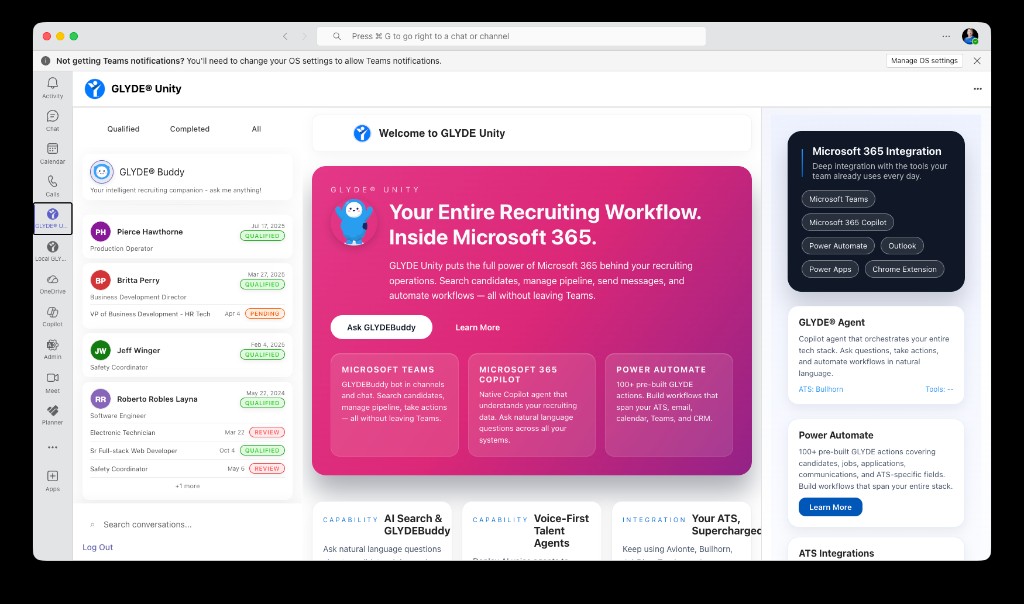
GLYDEBuddy in the Microsoft Teams app
In Teams. In the Browser. In Flow.
GLYDEBuddy meets recruiters where they already spend the day.
Two-Way Text, In Real Time
Talk with candidates live over two-way text, right inside Microsoft Teams, the Chrome extension, and the web app. Every reply carries full candidate and application context — and every message is logged straight to your ATS.
Live two-way text
Real-time SMS and chat with candidates — send, receive, and continue the thread without leaving your workspace.
Full application context
Each conversation is grounded in the live candidate, job, and application record, so replies are always informed.
Teams, browser & web
The same conversation follows you across Microsoft Teams, the Chrome extension, and the web app.
Conversation continuity
A candidate cut off mid-thread resumes naturally — context carries across sessions and surfaces.
Auto-logged to your ATS
Every inbound and outbound message is written back to your system of record as activity — no copy/paste.
Voice & text together
Candidates toggle between voice and text with full context maintained across both modes.
Set It. Schedule It. Forget It.
Don't just ask the agent for an answer — tell it what to do and when. Schedule messages, reports, status checks, reminders, and automatic follow-ups, then let them fire on time from the mobile app, Teams, or your browser.
Put GLYDEBuddy in Your Teams
See conversational recruiting in Microsoft Teams and the browser — grounded in your ATS, acting on your behalf.